Secure. Auditable. Evidence-preserving.

A stronger operating system for child protection work.

Child Protect Platform helps schools, education groups, safeguarding teams, and child-focused organizations manage sensitive concerns, case activity, users, schools, evidence, and accountability in one controlled environment.

Encrypted evidence handling Hardened server model Role-based access Audit-ready workflows Desktop, tablet, and mobile ready Free online safety training

Quick answer

What is Child Protect Platform?

Child Protect Platform is a secure safeguarding case management system for schools and education groups. It helps teams record concerns, manage child protection cases, preserve evidence, control access, and maintain a clear audit history across single-school and multi-school environments.

Best forSchools and education groups that need structured safeguarding reporting, case history, evidence handling, and role-based oversight.
Why it mattersSensitive child protection records should not be scattered across inboxes, personal devices, spreadsheets, or shared folders.
Not a replacement forProfessional safeguarding judgment, emergency response, statutory reporting duties, legal advice, or school safeguarding policy.

Common questions

What problem does Child Protect solve?

It gives schools a structured place to record safeguarding concerns, manage cases, preserve evidence, and keep actions accountable.

Who uses Child Protect?

The platform is designed for safeguarding leads, school leaders, authorized staff, administrators, and multi-school group safeguarding teams.

Can it support multi-school groups?

Yes. It is designed to support school-level separation and group-level oversight where authorized leaders need visibility across multiple schools.

Does it replace safeguarding procedures?

No. It supports safeguarding workflows and record keeping, but it does not replace professional judgment, emergency action, or legal reporting obligations.

Free online safety training

Protect children online with free awareness training.

Access planned child safety and parent awareness training covering online privacy, grooming warning signs, cyberbullying, sextortion, scams, gaming safety, reporting, recovery, and trusted-adult support.

Children and teensParents and caregiversShort checks before progressCertificate on completion
Learners complete the course through an online education platform. Short tests help confirm awareness before moving forward, and a certificate is issued after the full assigned course path is completed.
✓ Short knowledge checks✓ Certificate after full course✓ Child and parent tracks✓ Built for school awareness
Child safety tracks

Junior, Middle, and Teen courses

Age-appropriate lessons help children and teens build practical online safety skills, not fear. Junior courses use simple rules and story-led examples. Middle courses use scenarios and quick choices. Teen courses focus on privacy, account security, sextortion awareness, peer pressure, reporting, and getting help.

Safe sharingUnsafe contactGaming and chatsReport and tell
Parent awareness

Practical training for caregivers

Parent and caregiver lessons focus on recognizing warning signs, starting calm conversations, checking device and privacy settings, responding to incidents, preserving evidence, and building a family online safety plan before a problem becomes a crisis.

Warning signsConversation scriptsDevice safetyRecovery support

Downloadable leadership overview

A stronger brochure your team can actually use.

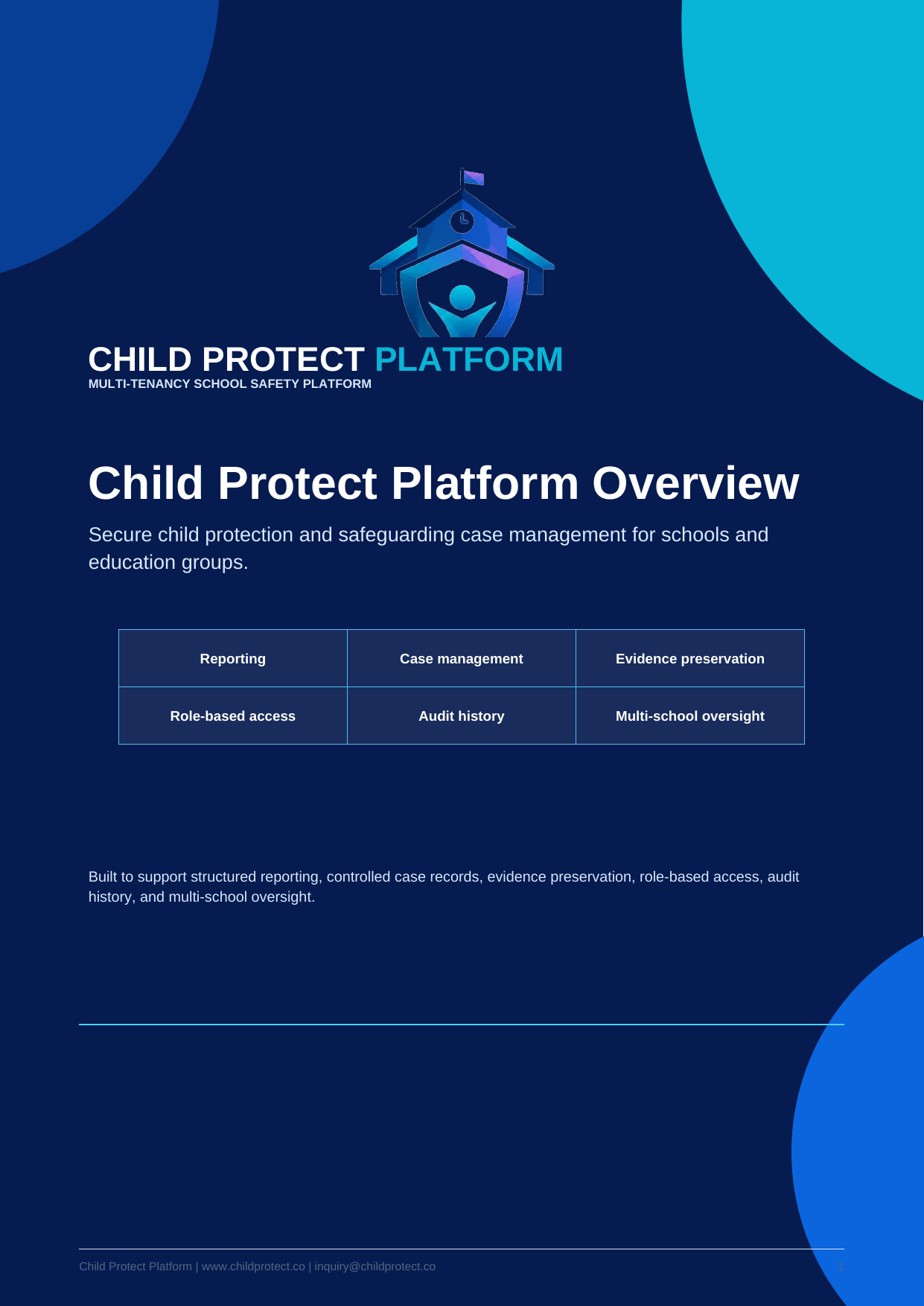
Download the expanded Child Protect Platform overview for principals, safeguarding leads, IT managers, and education group decision makers. The brochure now explains the problem, the platform workflow, evidence handling, access control, group oversight, implementation path, and demo preparation in a clear multi-page format.

8-page overviewSchool leadershipSafeguarding workflowEvidence and accessImplementation path
Child Protect Platform overview brochure cover
Expanded PDF overview

Desktop, tablet, and mobile ready.

Child Protect Platform is designed for modern web browsers, giving administrators, safeguarding teams, and school users responsive access from desktop, tablet, and mobile devices without requiring a separate app.

Designed to support PDPA-aware safeguarding operations in Thailand.

Child Protect Platform helps schools and child-focused organizations improve data control, evidence preservation, user access, and auditability in ways that support responsible Thailand-focused safeguarding operations.

Built for safeguarding teams

Clearer safeguarding workflows for schools and child-focused organizations.

Child Protect brings reports, case notes, evidence, permissions, and follow-up actions into one secure platform, helping teams move away from scattered emails, spreadsheets, shared folders, and informal notes.

Who it helps

Designed for teams responsible for child safety.

Schools

Give principals, safeguarding leads, counsellors, administrators, and staff a clear process for recording, reviewing, and following up on concerns.

Education groups

Support multiple schools, campuses, programmes, or tenants while keeping users, roles, and records properly separated.

Child-focused organizations

Maintain controlled case records, evidence handling, role-based permissions, and clearer accountability for sensitive work.

How it works

A simple operating flow for sensitive safeguarding work.

01

Step one

Report a concern

Staff submit safeguarding concerns through a clear, structured workflow instead of informal email chains or disconnected notes.

02

Step two

Review the case

Authorized safeguarding users triage, assign, update, and track cases with the right access controls in place.

03

Step three

Preserve evidence

Evidence, notes, status changes, and key actions stay connected to the case for review and accountability.

Key capabilities

Core tools for controlled safeguarding operations.

  • Structured concern reporting and case status tracking
  • Evidence upload with controlled access
  • Role-based permissions and multi-school administration
  • Audit trails for important activity and case actions
  • Thai and English support
  • Desktop, tablet, and mobile browser access
  • Google Workspace and workflow customization options
  • Designed for safeguarding, not generic ticketing

Why schools move now

Safeguarding information is too important to leave scattered.

When concerns, notes, evidence, and decisions live across email, spreadsheets, shared drives, and chat messages, it becomes harder to control access, review timelines, and prove what happened. Child Protect brings that work into a secure, structured workflow built for sensitive safeguarding operations.

Before Child Protect

  • Reports buried in email threads
  • Evidence saved in shared folders
  • Unclear access boundaries
  • Hard-to-review case timelines
  • Inconsistent follow-up and oversight

After Child Protect

  • Structured concern reporting
  • Evidence connected to the correct case
  • Role-based access and school boundaries
  • Clear case activity and audit history
  • More accountable safeguarding workflows

Product view

Show teams how the workflow works before they commit.

Use the product preview to explain how safeguarding teams can move from intake to review, evidence preservation, access control, and accountable case history in one controlled workflow.

Safeguarding dashboard

12Open cases
04Awaiting review
98%Assigned
Case CP-1042

Concern received • Evidence attached • Safeguarding lead assigned

Audit activity

User access reviewed • Status updated • Follow-up recorded

Structured case recordsKeep reports, notes, evidence, and follow-up activity connected to one case.
Controlled accessLimit sensitive information by role, school, tenant, and responsibility.
Review-ready historyKeep activity, status changes, and evidence handling easier to review later.

What setup includes

Implementation support that makes the platform useful from day one.

Setup is not just account creation. It helps align the system with your school structure, safeguarding process, and access-control needs.

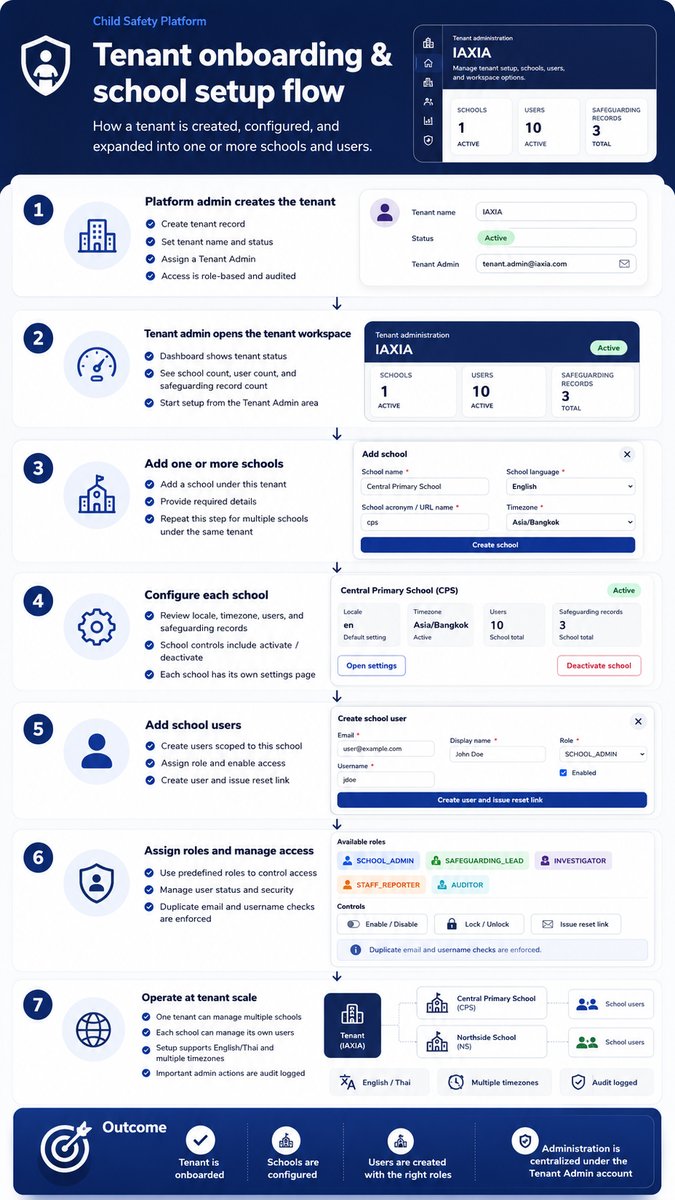
Tenant and school configuration

Create the structure for one school or multiple schools with clear boundaries between users and records.

Roles and access levels

Map administrators, safeguarding leads, investigators, reporters, and reviewers to appropriate permissions.

Workflow setup

Prepare reporting categories, case statuses, evidence handling, and review steps for your operating model.

Admin training

Help key users understand how to manage users, cases, access, evidence, and follow-up activity.

Integration review

Discuss Google Workspace, CRM exports, custom reports, and other school-specific workflow needs.

Launch readiness

Review the setup before live use so your team has a clear starting point and support path.

Common buyer questions

Answers for schools comparing safeguarding tools.

Can we just use Google Drive?

Shared drives are useful for general files, but safeguarding evidence needs stronger case context, access boundaries, and review visibility.

Is this only for large schools?

No. A single school can start with structured reporting and evidence handling, while multi-school groups can add central oversight and school separation.

Do staff need a mobile app?

No. Child Protect is designed for modern desktop, tablet, and mobile browsers, so schools can avoid separate app deployment.

Purpose-built for safeguarding, not generic ticketing.

Move from scattered emails, shared drives, spreadsheets, and informal notes to a controlled workflow built for sensitive child protection operations.

🛡️

Controlled safeguarding reports

Structured intake helps capture concerns consistently and route them to authorized safeguarding personnel.

🏫

Tenant and school separation

Designed for single schools, school groups, districts, foundations, and multi-site organizations with clear data boundaries.

👥

Role-based access

Platform admins, tenant admins, school admins, safeguarding leads, investigators, reporters, and auditors each receive appropriate access.

Safeguarding software for schools in Thailand.

A focused page for principals, school owners, safeguarding leads, and education groups explaining structured reporting, encrypted evidence preservation, role-based access, auditability, and PDPA-aware school operations.

View For Schools Page

Explore the platform by need.

Focused pages for school leaders, education groups, safeguarding teams, IT teams, and policy reviewers.

For Multi-School Groups

Tenant and school separation for organizations operating multiple sites.

View page

Case Management

Structured reporting, triage, assignment, notes, evidence, and status tracking.

View page

Evidence Preservation

Encrypted evidence handling, access control, scanning, audit trails, and recovery discipline.

View page

Custom Modifications

Adapt workflows, forms, roles, language, dashboards, evidence handling, and deployment details to fit your exact needs.

View customization options

Trust Center

Security, privacy, evidence preservation, reliability, and policy resources.

Visit trust center

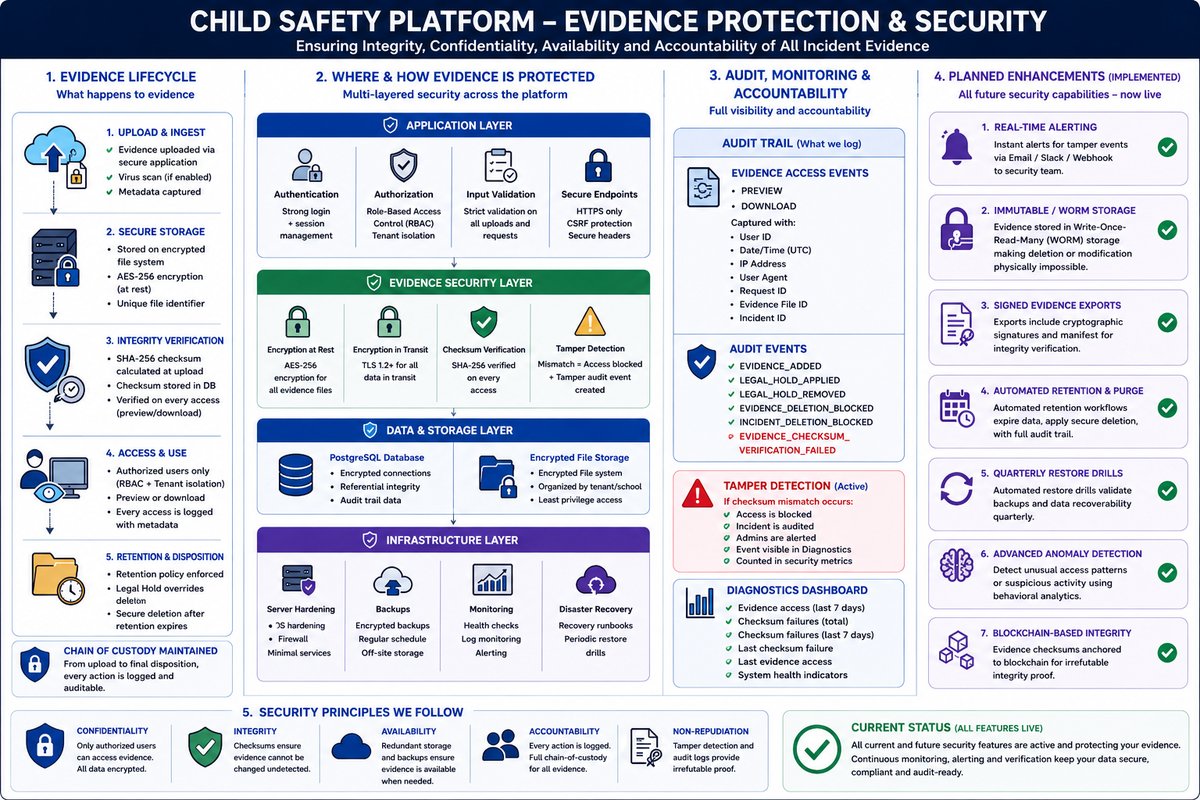
Security-first architecture for sensitive evidence.

The platform is designed around least privilege, encrypted file handling, hardened production hosting, malware scanning, backup discipline, and audit-ready workflows.

Encrypted evidence handlingUploaded files are protected through authenticated application workflows and preservation-focused storage controls.
Hardened hosting modelPublic traffic reaches HTTPS and the reverse proxy; application and database services remain internal where deployed that way.
Audit and accountabilityImportant user, case, evidence, and administrative actions can be recorded for later review.
Operational assuranceHealth checks, backup verification, malware scanning, and controlled deployment practices support reliable operation.

Evidence preservation from intake to review.

Safeguarding evidence must remain connected to the right report, school, tenant, user, timeline, and decision history.

Safeguarding workflow

1
Report

A concern is submitted through a structured process.

2
Review

Authorized safeguarding staff triage and determine next actions.

3
Preserve

Evidence is linked, scanned, protected, and retained according to policy.

Why it matters

Sensitive records may later be needed for leadership review, safeguarding oversight, regulatory reporting, law enforcement cooperation, or legal proceedings. The platform focuses on control, preservation, and defensible accountability rather than informal file sharing.

Helpful safeguarding guides for schools.

Short, practical resources explain case management, evidence handling, access control, and multi-school safeguarding operations.

1

What Is Safeguarding Case Management Software?

A practical guide for schools moving beyond email, spreadsheets, and shared folders.

Read guide →

2

Why Shared Drives Are Risky for Safeguarding Evidence

Shared folders are convenient, but safeguarding evidence needs stronger control and accountability.

Read guide →

3

How Schools Can Preserve Child Protection Evidence

A clear evidence workflow helps safeguarding teams protect records and review actions later.

Read guide →

Visual platform flows for faster stakeholder understanding.

Explore visual guides that show how Child Protect supports tenant onboarding, role-based access, evidence protection, administration, and complete safeguarding operations for schools and education groups.

Evidence upload and management flow diagram

Evidence upload and preservation

Shows upload validation, encryption, storage, audit logging, controlled access, and retention discipline.

Explore evidence preservation →

Want to understand whether this fits your safeguarding workflow?

Tell us about your safeguarding workflow, number of schools, and key security needs. We can help you understand where Child Protect may fit.

Contact Child Protect